Trading Order Types Explained for Beginners
Learn the difference between buy stop and sell stop orders, when traders use them, and how they work in breakout and breakdown trades.
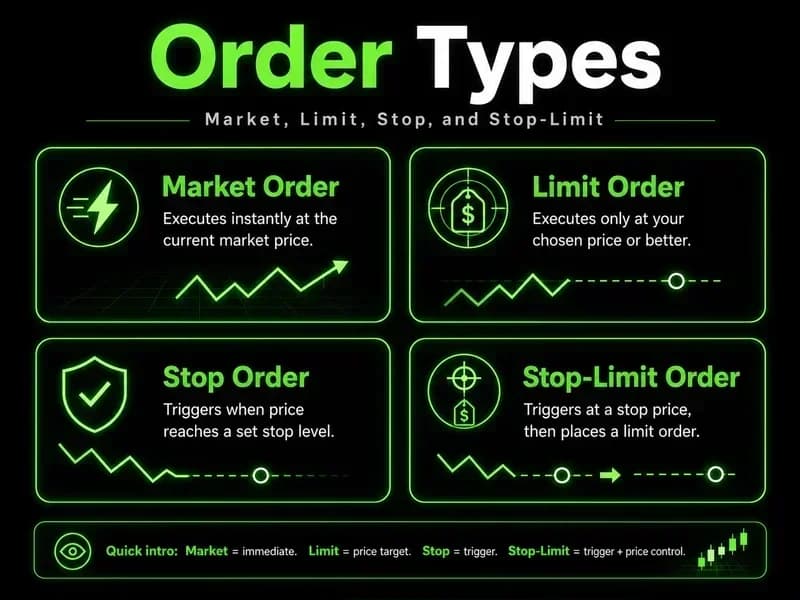
Trading order types explained for beginners usually start and end with three names: market, limit, and stop. That is correct as far as it goes, but it is also where most beginners get the framing wrong. Order types are not entry tools. They are risk-control mechanisms that happen to also enter and exit positions. The choice between a market order and a limit order is a choice about which risk you are willing to accept—slippage or non-execution—and the difference shows up in the account, not in the textbook.
The section below walks through every order type a beginner actually needs, in the order they show up on a real broker ticket. The focus stays on what each one does to your fill, your risk, and your screen time. Pretty definitions are easy. Knowing which order to use when the market is moving against you is the part that matters.
Trading order types explained: what an order actually is
An order is an instruction sent to the exchange (or to a broker that routes to the exchange) telling it what you want to buy or sell, at what price, and under what conditions. The exchange's matching engine pairs your order with someone willing to take the other side. If no one is, the order sits in the book—or never reaches the book at all, depending on the type.
Three variables define every order:
Side—buy or sell.
Price condition—at market, at a specific limit, or triggered by a stop price.
Time in force—how long the order stays alive if it does not fill.
Everything else—market, limit, stop, stop-limit, buy stop, sell stop, GTC—is a combination of those three. Once that frame is in place, the names stop feeling like a checklist and start feeling like a set of trade-offs. Market orders: speed at the cost of price
A market order tells the broker, "Fill me right now, at whatever the best available price is." Execution is effectively certain during normal trading hours. The price is not.
On a liquid instrument like the S&P 500 futures or a megacap stock during the cash session, the difference between the price you saw and the price you got is usually negligible—a tick, sometimes two. On thin instruments, illiquid pre-market sessions, or during a news-driven move, the same order can fill several ticks away from the displayed quote. That difference is called slippage, and it is a real cost. We covered the mechanics of how the bid-ask spread and slippage eat into entries in a separate piece—the short version is that market orders pay that cost in full.
Use a market order when:
The instrument is liquid, and the spread is one tick.
You need to be in or out of the position immediately—for example, exiting a losing trade where waiting for a limit fill is the bigger risk.
The cost of slippage is smaller than the cost of missing the move.
This is the part where the textbook framing breaks down. A market order is not a beginner default. It is a deliberate choice to accept slippage in exchange for certainty of execution. Treat it that way.
Limit orders: price at the cost of certainty
A limit order works in the opposite direction. You name a maximum price you are willing to pay (for a buy) or a minimum you are willing to receive (for a sell). If the market reaches that price, the order can fill. If it does not, the order sits in the book until it expires.
The trade-off is built into the definition. You get price control. You give up the certainty of being filled. On a quiet day with stable conditions, that is a good deal—the limit becomes your way of entering only at levels that match the plan. On a fast-moving day, the same limit can leave you watching the move go without you, because it price-tagged your level by a tick and reversed before the order matched.
Use a limit order when:
You have a specific level the entry must respect.
You are working on an order over time, and price improvement matters more than speed.
You are exiting at a target where the market has to come to you, not the other way around.
The most common beginner mistake here is using limit orders for stops. A stop is supposed to fire when the market is going against you. Using a limit means accepting that the market might gap through your level and leave you holding a larger loss than the original plan allowed.
Stop orders: triggers, not entries
A stop order is dormant until the price trades at or through the stop price. At that point it activates and becomes a market order. Until then it sits in the book unfilled and invisible to the matching engine.
This is the order type beginners most often misuse, because the name says "stop" and the textbook examples almost always show it as a loss-limiting tool. It can do that. It can also be used as a breakout entry—a buy stop placed above resistance, a sell stop placed below support—where the activation itself is the signal. Both uses are legitimate. The misuse is treating the stop as if it locks in an exit at the stop price. It does not. It produces a market-order execution after the trigger, which on a gap or thin liquidity can be several points away from where you wanted out.
The stop-market order is honest about its risk: certain trigger, uncertain fill. That honesty is the whole reason the next order type exists.
Stop-limit orders: a defined ceiling on slippage
A stop-limit order combines the two. You define a stop price (the trigger) and a limit price (the worst fill you will accept). When the market trades through the stop, the order activates as a limit—not a market. If the price keeps running past the limit, the order does not fill at all.
The trade-off changes shape. The stop-limit caps your slippage on the exit, which is genuinely useful in normal conditions. The cost is that during the exact scenarios where you most need the stop-gap moves, news spikes, and low-liquidity hours, the limit can be skipped entirely, and the position stays open while the market runs.
This is the one I would point a beginner away from until they understand exactly which scenario they are protecting against. On liquid markets in cash hours, the difference between a stop market and a stop limit is usually a tick. On thin overnight tape in NQ or GC, the difference can be the entire premise of the trade. When this doesn't work, it is well-defined: any condition where price can move faster than the limit can fill—overnight, news, holidays, thin liquidity—and the stop-limit becomes a stop that fails to stop you out.
Buy stop vs sell stop orders—what they actually do
The direction of a stop is decided by where the trigger sits relative to the current price, not by intent.
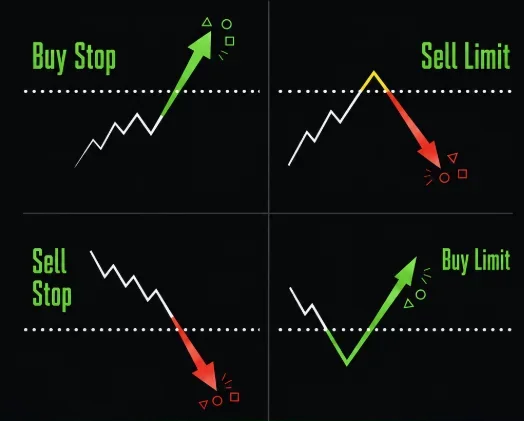
A buy stop sits above the current price. It activates when the price rises to the stop level. Two common uses: breakout entries on a long bias or covering a short position if the price runs against it.
A sell stop sits below the current price. It activates when the price falls to the stop level. Two common uses: breakdown entries on a short bias or stopping out a long position.
The symmetry is the point. The same mechanism—"trigger when price trades through this level"—does either job depending on where the level is placed. Beginners sometimes assume "buy stop" means buying at a better price than the market. It does not. It means buying at a worse price than market, on purpose, because the activation price is what confirms the move you wanted to participate in.
Day orders vs good-till-cancelled—picking the time in force
Time in force decides what happens to an unfilled order at the end of the session.
A day order expires automatically at the close of the regular session. If it has not filled, it is gone. This is the default on most broker tickets and the right default for most beginners.
A good-till-cancelled order (GTC) stays active across sessions until it fills or you cancel it. Brokers cap GTC lifetime at 60 or 90 days depending on the firm.
The practical difference is screen time. A GTC limit at a key level can fill while you are asleep, on a news spike, in conditions you did not plan for. A day order forces you to make the decision again the next session. Until your process is consistent enough that the original plan still applies on a new day, the day order is the safer default. GTC becomes useful later, mostly for swing-trade limits at structurally important levels.
Order type cheat sheet
Order type | What it locks in | What it does not | Best used when |
|---|---|---|---|
Market | Execution | Price | Need in or out now; spread is one tick |
Limit | Price (or better) | Execution | Level matters more than speed |
Stop (stop-market) | Activation at trigger | Fill price | Defining an exit on a position you already hold |
Stop-limit | Activation and a worst-case price | Execution at all | Stop on liquid instruments during cash hours |
Buy stop | Trigger above market | Fill price | Breakout entry or short cover |
Sell stop | Trigger below market | Fill price | Breakdown entry or long stop-out |
Day | Active until session close | Anything overnight | Default for most discretionary trades |
GTC | Active up to broker's cap | A reason to ignore it | Swing limits at structurally important levels |
How to place a trading order: the actual sequence
Most broker tickets walk through the same fields in the same order. Side, instrument, quantity, order type, price (if limit or stop), time in force, then preview and submit. Two parts deserve more attention than they get:
Quantity—this is where position sizing and the risk-reward ratio need to already be decided before the ticket opens. A correctly chosen order type with the wrong size is still a bad trade.
Price field—limit and stop prices have to respect the instrument's tick size. Brokers reject orders priced between ticks. On futures this is a hard rule; on stocks it depends on the venue.
Preview the ticket before submitting. The preview screen shows the worst-case dollar exposure if the order fills, and that number should match the figure your plan was built around. If it does not, the size is wrong.
Best order types for beginner traders
For anyone in the first six months of live execution, the working set is short:
Limit orders for entries. They force the price to come to you, which removes most of the rush.
Stop-market orders for exits. Accept the slippage. The point of the stop is to be out, not to be out at a specific price.
Daytime-in-force for everything, unless there is a structural reason to leave a limit working overnight.
Market orders, stop limits, GTC, and the more exotic conditional orders are all useful—eventually. They become useful once you can describe, before the trade, the specific scenario where each one fits better than the simpler version. Until then, the simpler version is the default, and the complexity is a place where execution mistakes compound. Most traders do not have a strategy problem with orders; they have a discipline problem with which order type they use under pressure.
If the instrument itself is unfamiliar—futures versus equities versus FX—that decision deserves to be made before the order type one. The trading instruments guide for beginners covers how the tick mechanics differ across them, and the difference matters for stop placement. Order behavior is also affected by leverage and margin mechanics—a small slippage on a leveraged position is not a small dollar number—and by where you place the protective level itself, which the stop-loss and take-profit guide covers in detail.
FAQs
What is a market order in trading? A market order is an instruction to fill immediately at the best available price. Execution is effectively certain during normal hours, but the fill price can drift from the displayed quote, especially in thin liquidity or fast-moving conditions.
What is the difference between a market order and a limit order? A market order takes whatever price the book gives and puts execution first. Price is given priority in a limit order, which also assumes the risk that the order might never be filled. One exchanges certainty for price control, while the other exchanges price control for certainty.
How do limit orders work for beginners? You set a maximum buy price or a minimum sell price. The order sits in the book until either the market reaches your price and matches or the time in force expires. You only get filled at your price or better—never worse.
What is the difference between a stop order and a stop-limit order? A stop order becomes a market order once the stop price triggers, so activation is certain, but the fill price is not. A stop-limit becomes a limit order once triggered, so it caps slippage but may not fill at all if the price runs past the limit.
What is the difference between a buy stop and a sell stop order? A buy stop sits above the current price and activates on a move up—used for breakout entries or covering shorts. A sell stop sits below the current price and activates on a move down—used for breakdown entries or stopping out longs. The mechanism is identical; only the placement differs.
Which order types should beginners actually use? Limit orders for entries, stop-market orders for exits, and daytime-in-force as the default. Add market orders, stop limits, and GTC only when there is a specific scenario where each one fits better than the simpler default—not before.
Worth the read?